Connected apps & API
Tabulox works with the other tools you use, in three ways:
- AI assistants — Claude, ChatGPT and other AI apps that can work in Tabulox for you.
- Work tools — Jira, Toggl Track and Clockify, so the time your team tracks there can be billed.
- The API and webhooks — for Zapier, Make, n8n or your own systems.
Connected apps live in Settings → Connected apps, and API keys and webhooks in Settings → Developers. Connecting AI apps and the API are part of the Pro and Scale plans.
AI assistants (MCP)
Claude, ChatGPT, Claude Code, Cursor and other apps that support the Model Context Protocol (MCP) can connect to your workspace. They can look up clients, invoices, quotes, contracts, projects and opportunities, and create drafts for you to review in Tabulox. They can't send, charge or delete anything.
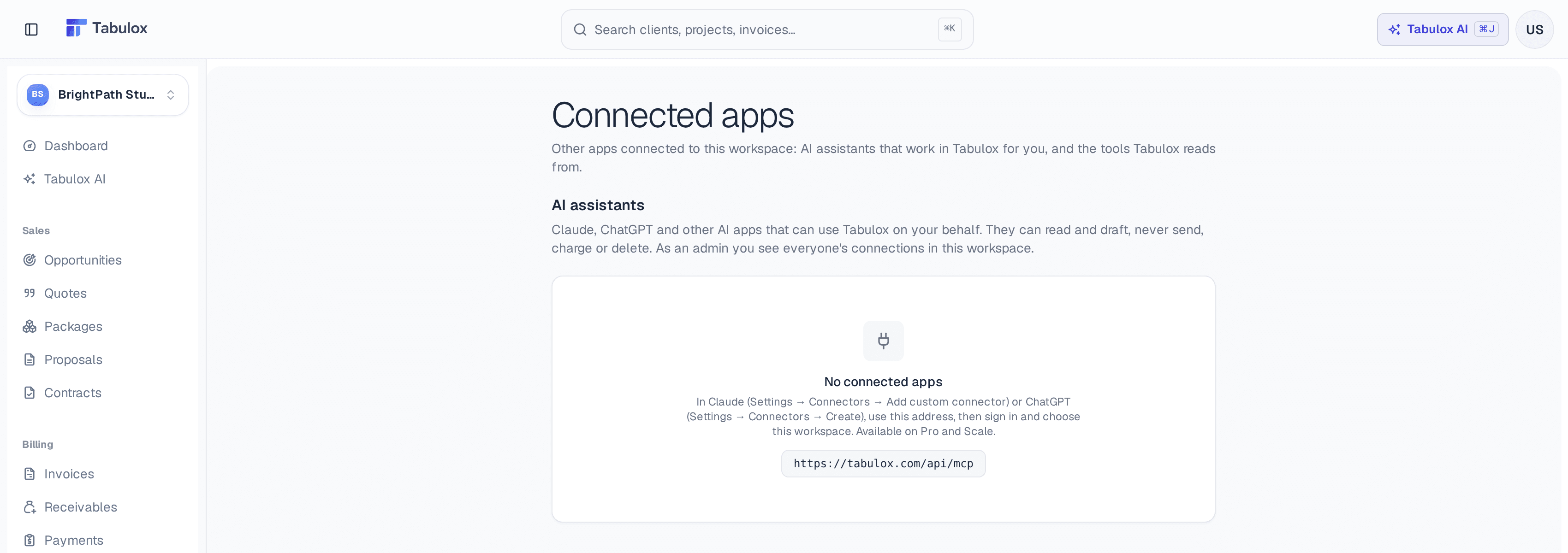
Claude.ai or ChatGPT
No key needed:
- Add a connector
In Claude, go to Settings → Connectors → Add custom connector. In ChatGPT, Settings → Connectors → Create. Use the address
https://tabulox.com/api/mcp. - Sign in
Sign in to Tabulox, choose the workspace, and review what the app can and can't do.
The app acts as you, with your role in the workspace. Your connected apps are listed in Settings → Connected apps, where you can disconnect them; admins see everyone's connections in the workspace.
Claude Code, Claude Desktop or Cursor
Create an API key in Settings → Developers (see below), then follow the steps on the Connect an AI app (MCP) card there. It has a tab for each app.
Tabulox AI, built into Tabulox, can do the same things and more, without connecting anything.
Work tools: Jira, Toggl Track and Clockify
If your team tracks time in Jira, Toggl Track or Clockify, Tabulox can bill it. Tabulox only ever reads from these tools; it never changes anything in them.
- Jira — an admin connects your Jira site by signing in.
- Toggl Track and Clockify — an admin pastes an API key (a workspace admin's key, so everyone's time comes through).
Then match each person in the tool to a teammate in Tabulox, with the hourly rate their time is billed at, and link a project to the matching project there. See Projects → Time from Jira, Toggl Track or Clockify.
API and webhooks
Settings → Developers (Pro and Scale) has your API keys and webhook endpoints. Admins and owners create and revoke them.
API keys
Create key makes a key that acts as the person who created it, with their
role. A key can read your workspace's data and create clients, invoices
(as drafts), projects, tasks and time entries. Send it as a Bearer token to
https://tabulox.com/api/v1. The Developers page lists every endpoint, with
an example.
You can list clients, invoices, quotes, proposals, contracts, projects, tasks, bookings, leads, package orders and time entries, or fetch one by its id.
Webhooks
Add endpoint gives Tabulox a URL to send a signed event to when something happens:
| Event | When |
|---|---|
client.created | A client is added |
lead.created | A new opportunity comes in |
quote.sent / quote.accepted | A quote is sent, or accepted |
proposal.accepted | A proposal is accepted |
contract.signed | A contract is signed |
invoice.sent / invoice.paid / invoice.overdue | An invoice is sent, paid (online or recorded by hand), or becomes overdue |
project.created | A project is created |
task.completed | A task is completed |
booking.created | Someone books time with you |
package.ordered | A package is bought |
Each event carries the record, in the same shape as the API.
Limits
| Pro | Scale | |
|---|---|---|
| Webhook endpoints | 25 | 50 |
| API calls per minute | 60 | 300 |
An endpoint that answers 410 Gone — for example a Zap you deleted — is switched off instead of being retried.
Zapier, Make and n8n
All three connect with an API key from Settings → Developers:
- Zapier — Tabulox's 13 events are instant triggers ("New paid invoice"). Its actions create a client, an invoice draft, a project, a task, or log time, and its searches find a client (or create one), a project or an invoice.
- Make and n8n — use their HTTP and webhook modules: add your scenario's webhook URL as an endpoint in Tabulox for triggers, and call the API with your key for actions.